@yoy.delarama
Thank you for reaching out to us.
This forum is dedicated to software developers using LSEG APIs. The moderators on this forum do not have deep expertise in every bit of content available through LSEG products, which is required to answer content questions such as this one.
The best resource for content questions is the Helpdesk support team, which can be reached by submitting queries through LSEG Support. The support team will either have the required content expertise ready available or can reach out to relevant content experts to get the answer for you.
You need to ask for the Excel formula, such as =RDP.Data, that can be used to retrieve the required data. Then, we can help you converting that formula to Python code.
Hi @Jirapongse thank you for your response and attention to this query. I have 2 Workspace Excel formulae:
=@RDP .Data("USDSROIS=","") which pulls all the tenors/RICs from the chain RIC < USDSROIS= >
=@RDP .HistoricalPricing($B$4:$B$43,"CLOSE;BID;ASK;MID_PRICE","SOURCE:RFV START:01-Jan-2016 END:31-Dec-2025 INTERVAL:P1D",,"TSREPEAT:NO CH:IN;Fd RH:Timestamp",D3) which pulls the historical data of all the tenors/RICs (cells B4:B43) on a specified period. Here are the tenors/RICs pulled from the first formula: USDSROISON= USDSROISSW= USDSROIS2W= USDSROIS3W= USDSROIS1M= USDSROIS2M= USDSROIS3M= USDSROIS4M= USDSROIS5M= USDSROIS6M= USDSROIS7M= USDSROIS8M= USDSROIS9M= USDSROIS10M= USDSROIS11M= USDSROIS1Y= USDSROIS15M= USDSROIS18M= USDSROIS21M= USDSROIS2Y= USDSROIS3Y= USDSROIS4Y= USDSROIS5Y= USDSROIS6Y= USDSROIS7Y= USDSROIS8Y= USDSROIS9Y= USDSROIS10Y= USDSROIS11Y= USDSROIS12Y= USDSROIS13Y= USDSROIS14Y= USDSROIS15Y= USDSROIS20Y= USDSROIS25Y= USDSROIS30Y= USDSROIS35Y= USDSROIS40Y= USDSROIS45Y= USDSROIS50Y= Not sure if these formulae can be combined in a single code in PyCharm. Thank you very much for your help on this.
Hi @yoy.delarama ,
Could you please try this
import lseg.data as ld

ld.open_session()
ld.get_history(

    universe=['USDSROISON=','USDSROISSW=','USDSROIS2W=','USDSROIS3W=','USDSROIS1M=','USDSROIS2M=','USDSROIS3M=','USDSROIS4M=','USDSROIS5M=','USDSROIS6M=','USDSROIS7M=','USDSROIS8M=','USDSROIS9M=','USDSROIS10M=','USDSROIS11M=','USDSROIS1Y=','USDSROIS15M=','USDSROIS18M=','USDSROIS21M=','USDSROIS2Y=','USDSROIS3Y=','USDSROIS4Y=','USDSROIS5Y=','USDSROIS6Y=','USDSROIS7Y=','USDSROIS8Y=','USDSROIS9Y=','USDSROIS10Y=','USDSROIS11Y=','USDSROIS12Y=','USDSROIS13Y=','USDSROIS14Y=','USDSROIS15Y=','USDSROIS20Y=','USDSROIS25Y=','USDSROIS30Y=','USDSROIS35Y=','USDSROIS40Y=','USDSROIS45Y=','USDSROIS50Y='],

    fields=['CLOSE','BID','ASK','MID_PRICE'],

    start='01-01-2016', end='31-12-2025', interval='1D')
The example code can be found in https://github.com/LSEG-API-Samples/Example.DataLibrary.Python/blob/lseg-data-examples/Examples/1-Access/EX-1.01.02-GetHistory.ipynb
Python helper function can be used to see supported interval
help(ld.get_history)
You can use the LSEG Data Library for Python to retrieve data. The examples are on GitHub.
First, you can use the Chain method to expand a chain RIC.
chain = Chain("USDSROIS=")
print(chain.constituents)
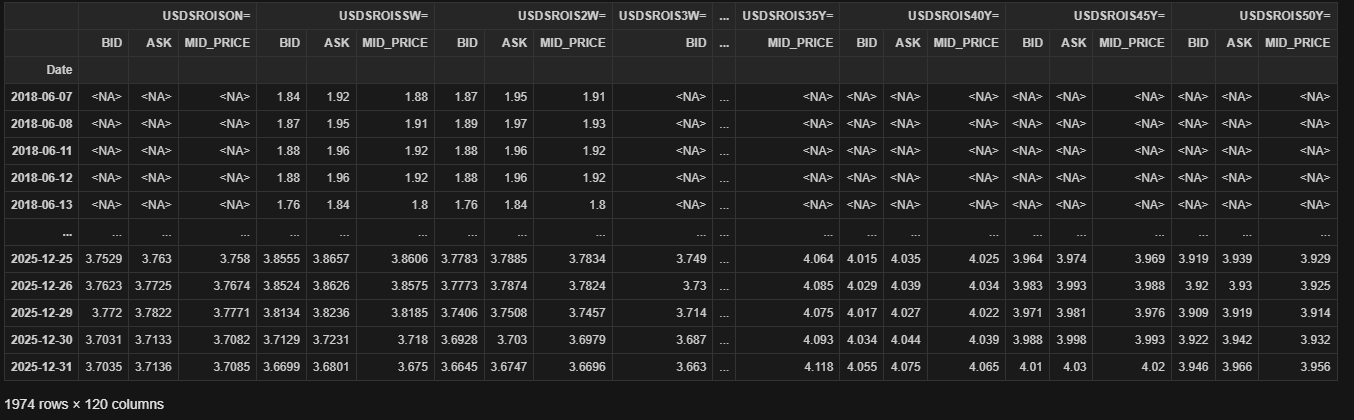
Then, you can use the ld.get_history method to retrieve historical data.
df = ld.get_history(
        universe = chain.constituents[1:],
        fields = ['BID','ASK','MID_PRICE'],
        start = '2016-01-01',
        end = '2025-12-31',
        interval = '1d')
df
Those RICs do not provide a CLOSE field. After checking, I found that for these RICs, the CLOSE and BID fields contain the same values. I use chain.constituents[1:] because I removed the first expanded RIC, which is MONEY.
Hi @Jirapongse @raksina.samasiri thanks much for all your help and responses. Just wondering if these codes will work on PyCharm? Sorry, I'm working on this with a client and he prefers PyCharm not WS Codebook. Thanks much!
Yes, this code can be run with PyCharm, the user can follow Quick Start | Devportal guide - Getting Started with Python.
The Codebook application is cloud-hosted coding environment (Jupyter notebook) to make it easy for the user to explore and use our Python library with no set up required. However, they can follow the guide provided to set up an environment and do the coding on their local environment.
PyCharm is an IDE for developing Python applications, and both Codebook and PyCharm can execute Python code.
Therefore, the client needs to install the LSEG Data Library for Python in the PyCharm environment and run the code.
Hello @yoy.delarama
The Data Library for Python can be used and run on the PyCharm IDE (or any Python editor including Codebook which is basically the JupyterLab on the Cloud).
The client can follow the steps on the https://developers.lseg.com/en/article-catalog/article/how-to-set-up-python-development-project-with-pycharm article to set up the Data Library for Python and run the Python script in PyCharm.