@SHAM
Thank you for reaching out to us.
The refinitiv.data library is quite old so please use the LSEG Data Library for Python library instead.
Please refer to the answer on this discussion. Please check the version of the httpx library used in the Python environment.
Hi Good day
i had connect with client on the details shared earlier, but client had follow up sharing below check and confirm please.
Follow up -
I carefully red the documentation of lseg.data package and it seems that the issue I have comes from the configuration of the session when typing “open_session” but I am not sure how to properly set up the exact necessary requirements to have no issue, and I seems not to understand how to do it from the documentation : https://developers.lseg.com/en/api-catalog/lseg-data-platform/lseg-data-library-for-python/quick-start/access-credentials
From having installed the package with “pip install lseg-data”, can you please advise me on what action I should do in the “site-packages/lseg” from my python environment to set up the session with my APPKEY please ? Thank you. (Bellow a sample code that I tested)
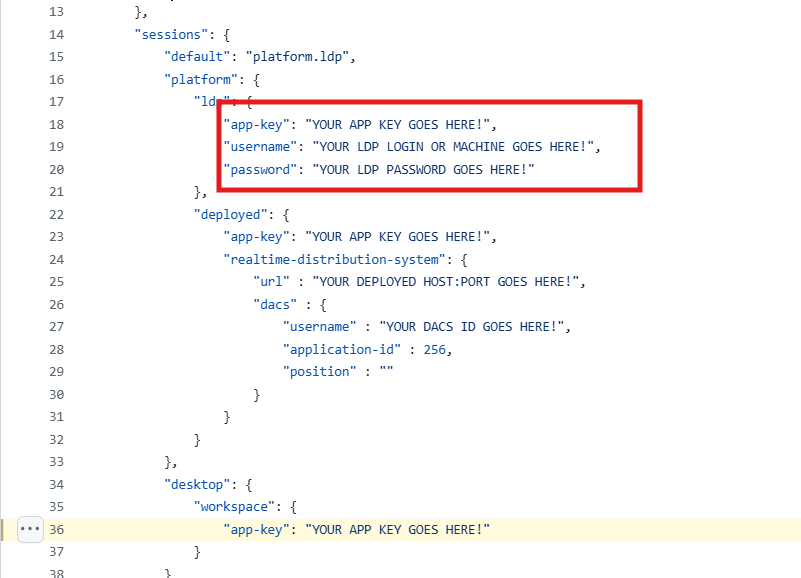
You can download the examples on GitHub. The examples use the lseg-data.config.json configuration file.
If the client uses the workspace, set the default session to "desktop.workspace" and set the app-key. The application key can be generated by using the App Key Generator tool on Workspace.
If the client uses the Data Platform session, set the default session to "platform.ldp" and set the app-key, username, and password configurations.
Then, run the EX-1.01.01-GetData example.